
Arcade Game guide
Bubble Grove: why the ceiling counter resets
The ceiling in Bubble Grove moves after shots without a pop, not after a timer. Read the counter, reset it with a match, and check Swap before firing.
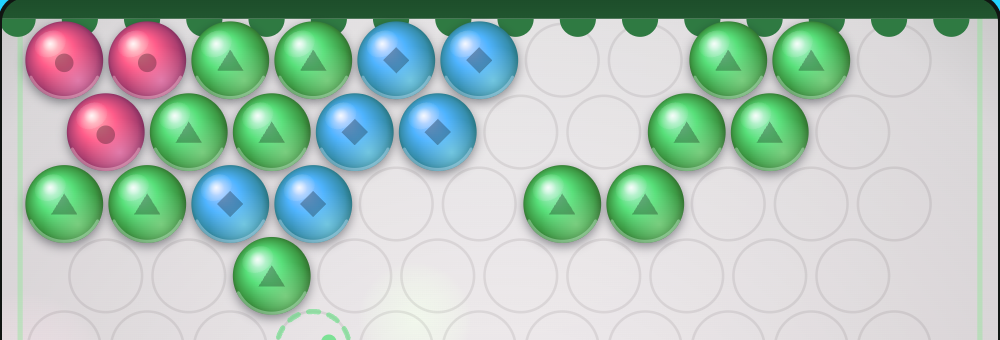
In Bubble Grove, Ceiling drops counts shots without a pop, not seconds. You can stop aiming and study the board without spending that allowance. A successful match resets the counter, even though your total shot count keeps rising.
That distinction matters when the board starts getting crowded. Rushing another bubble into a convenient gap can bring the ceiling closer. Look for a reachable group of the loaded colour first.
Read the two counters separately
Shots is the total you’ve fired in the stage. It is shown beside par, the stage’s shot target. Ceiling drops is the number of further non-popping shots allowed before the board moves down a row.
First Light, stage 1, starts with in 6 shots. Other stages can use a different allowance, so read the current display rather than carrying that number through the campaign.
In the example above, the first two shots popped groups. The third sent a green bubble beneath a blue pair on the left. It stuck without making a group of three, leaving the score at 140 and changing the ceiling counter to in 5 shots.

A pop restores the allowance, not the board
For the fourth shot, another green bubble went into the connected green group on the right. That group popped, the score reached 210, and the ceiling counter returned to in 6 shots. The total was still 4 shots.

A pop doesn’t lift a ceiling that has already descended. It resets the allowance before the next descent. When the display says in 1 shot, a non-popping shot brings the board down; a match buys another full allowance instead.
Check the next bubble before committing
The small next bubble gives you another colour to consider. Use Swap, press X, or select that bubble to exchange it with the loaded one. Swapping doesn’t fire a shot or consume the ceiling allowance, but you can only swap once before firing. If both colours are the same, Swap is unavailable.
After the fourth shot in this example, green was loaded and blue was next. Swap put blue in the launcher while the total stayed at 4 and the ceiling allowance stayed at 6. The button then disabled until the next shot.
On a mouse, move to aim and click to fire. On touch, drag to aim and release to fire. Find where the dotted guide ends, check the colour there, and then decide whether the loaded bubble or the next one offers a useful match. A clear match is worth more breathing room than a hurried shot that merely fits.