
Strategy Beginner guide
Meadowfold: read the edge preview before you place
A red cross in Meadowfold does not block an Easy placement. Learn to read matching edges, turn a tile and use Undo before spending your next tile.
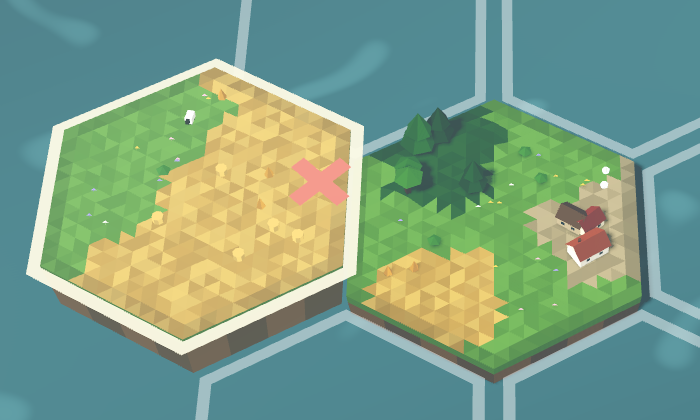
A red cross in Meadowfold, our hex-tile landscape game, means this edge does not match its neighbour. On Easy, it does not mean the placement is forbidden. You can spend a tile and earn nothing from that edge.
Before pressing Place, read the short prediction beside it. Then try turning the tile. The example below changes a zero-point placement into a 10-point placement at the same spot.
Read the prediction, not just the outline
Choose Easy for this exercise. Move the pointer over an empty hex next to the landscape. On a touch screen, tap the outlined hex to select it. The hovering tile shows what would go there; it has not been placed yet.
In the first picture, the preview reads +0 · 0 matching · 1 not:
- +0 is the edge-placement score shown for this orientation.
- 0 matching means none of the touching edges match.
- 1 not means one touching edge is a mismatch.

Only edges touching existing tiles are being compared. An edge facing an empty hex is not a mismatch. A tile can therefore have one matching neighbour even though its other five edges face open space.
Turn the tile without spending it
Keep the same empty hex selected and press Turn. Watch the marker where the two tiles meet and read the prediction again. Continue through the orientations if needed; turning does not place the tile.
In this Easy run, the starting tile in hand had both green meadow and yellow field edges. Turning it brought a matching edge against the neighbour. The red cross became a green chevron, and the preview changed to +10 · 1 matching.
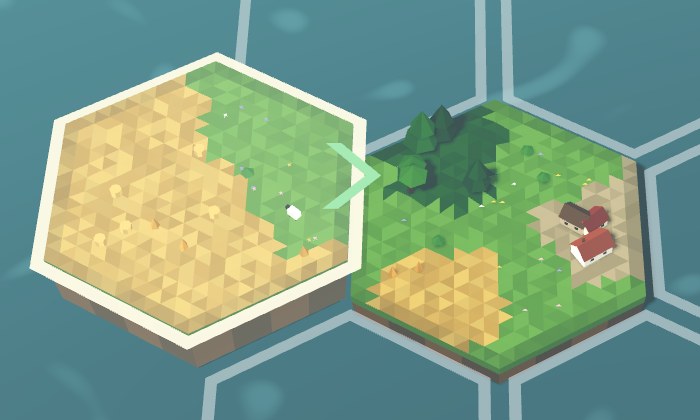
Pressing Place in that position raised the score from 0 to 10 and changed the displayed tile supply from 40 to 39. A matching edge earns points; this single match did not refund the tile.
Your opening tile may be different. If every edge on your tile is the same terrain, turning it cannot change which terrain faces the neighbour. Try another empty hex instead. As the landscape grows, check all the touching edges: a turn that fixes one side can spoil another.
Use Easy’s Undo to compare the result
The zero-point version was playable too. In the checked example, pressing Place on the red-cross preview left the score at 0 and reduced the displayed supply to 39. Undo restored the opening position and 40 tiles. That made it possible to turn the same tile and try the matching version shown above.
Use Undo immediately after the move you want to take back. Easy offers the last-tile undo; do not assume that safety net is available on the other tiers. This example also has no active quest, so its score change comes from the edge match alone.
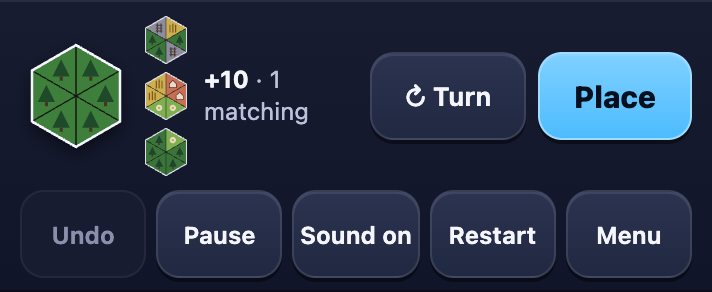
For your next move, compare two nearby empty hexes before placing. Look for a higher match count, then check that you have not added a mismatch elsewhere. Once that preview is familiar, the Meadowfold section of our nine-game guide explains the next distinction: a single matching edge is not yet a perfect fit.