
Strategy Game guide
Meadowfold Hard: why one placement can cost two tiles
Read Meadowfold’s broken-path warning on Hard. See why a rail mismatch spent two tiles, and how turning the same tile removed the extra penalty.
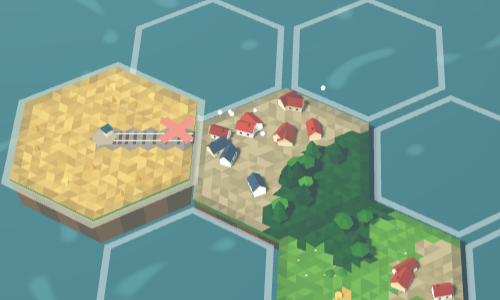
On Hard, a placement in Meadowfold can spend more than the tile you put down. If a river or rail edge meets a different terrain on a neighbouring tile, you lose an extra tile for that broken path. The game still lets you press Place.
Watch for breaks a path, -1 tile beside the controls. That is an extra cost, not the total cost of placing. In the example here, the displayed supply fell from 33 to 31, while the score stayed at 10.
Read the warning before Place
Hard changes the cost of a mismatch involving a river or rail. A mismatch between ordinary terrain edges can miss out on points without adding that path penalty. An edge facing empty space does not break a path: the penalty concerns edges that touch existing tiles.
In this touch-browser example, a field tile has one rail edge. With that rail facing the village next door, the prediction reads +0 · 0 matching · 1 not · breaks a path, -1 tile.
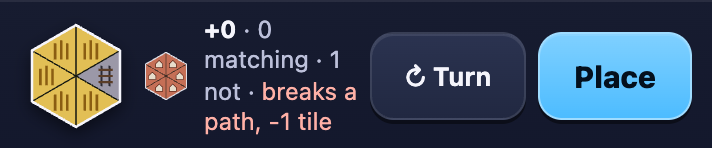
The +0 refers to points from the edge placement. The -1 tile refers to the supply. Read both before committing, especially when several neighbours touch the selected hex.
Turn the path away from the mismatch
Keep the empty hex selected and use Turn to compare orientations. Turning alone does not place the tile. On a touch screen, tap an outlined hex to move the preview there, then use the separate Turn and Place buttons. With a mouse, hover over an outline to preview it.
The same tile at the same spot also had an orientation with +0 · 0 matching · 1 not, but no broken-path warning. Its field edge, rather than its rail, faced the neighbour. It still offered no edge points, but it avoided the extra path cost.
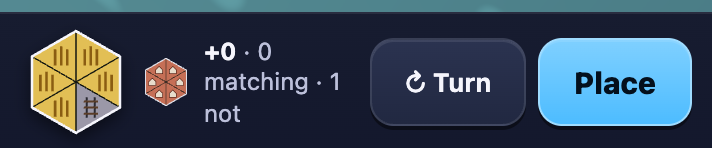
If turning fixes one edge but creates another warning, try a different outlined hex. Check every touching side rather than only the end of the rail you first noticed.
Account for the two tiles spent
To check the penalty, the tile was turned back to the warning orientation and placed. The supply went from 33 to 31: one tile used for the placement, plus one lost for the broken path. The score remained 10. There was no active quest or perfect-fit reward in this example to change the result.
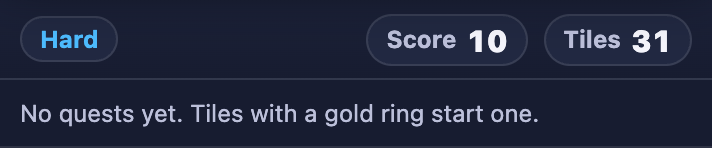
Hard has no last-tile Undo. Compare the previews before Place rather than expecting to take the move back. Your tiles and board will differ from this run; use the warning on your own position instead of copying its location.
If reading the preview is still unfamiliar, start with the Easy edge-preview guide. Easy lets you undo the last tile while you learn the difference between a mismatch and a match. Return to Hard when you want to manage the extra river and rail costs as well.