
Strategy Game guide
Meadowfold: why your field quest is still at 1/4
Meadowfold quests count connected tiles, not every patch of the same terrain. Follow a field quest from 1/4 to 2/4 by joining the right edges.
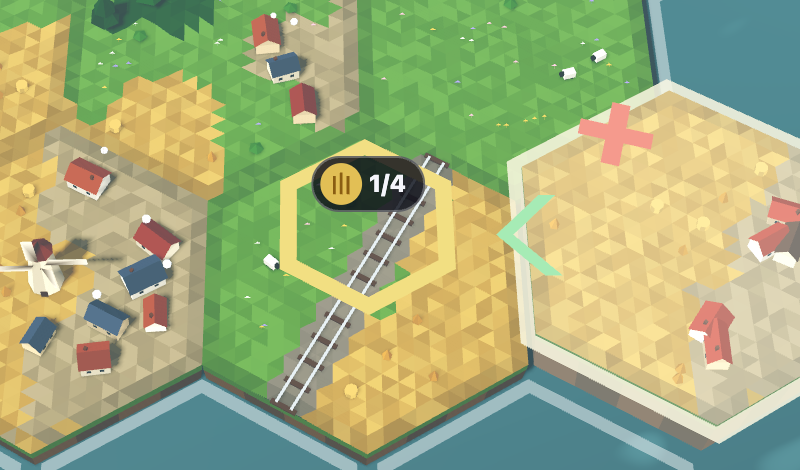
A field quest in Meadowfold counts tiles connected to its marked tile through matching field edges. It does not count every yellow patch on the landscape. Two tiles can sit beside each other and still belong to separate field groups if their touching edges are different terrains.
In this Easy run, the quest read field 1/4 · at least 4 despite several fields nearby. Putting another field elsewhere left it at 1/4. Moving that same tile beside the quest, with field meeting field, raised it to 2/4.
Read the quest as a group size
The gold ring identifies the quest tile. Its 1/4 badge means one tile currently belongs to the group, with a target of four. The mixed tile in this example carries meadow, rail and field, but it starts as one tile in the field group. Its separate field edges do not count as separate tiles.
On Easy, the quest strip says at least 4. Read the words as well as the numbers. This example is not an exact-size or closed-group quest from a higher tier.

Join the field edges, not just the tiles
Start at the gold-ringed tile and trace its yellow field to an open edge. Preview your next field tile beside that edge. If the touching side is meadow, village or another terrain, use Turn or try a different empty hex.
In the example below, the green chevron on the left of the hovering tile marks the field-to-field connection. The red cross at its top is a mismatch against a different neighbour. That mismatch did not stop the placement on Easy or prevent the matching field edge from joining the quest.
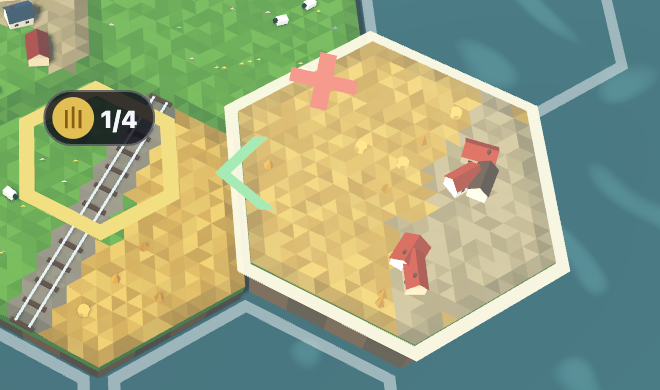
The badge still reads 1/4 during the preview. Press Place, then check the count after the tile lands.
Check what changed after Place
Easy’s Undo let the same tile be tested in both positions. The separate placement and the connected placement each earned 10 points, taking the score from 70 to 80. Only the connected placement advanced this quest.
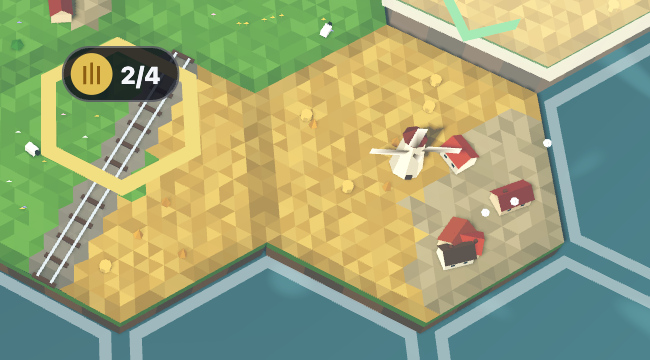
For the next connection, you can extend from either tile in that field group. Follow matching field edges back to the marked tile; the new tile does not have to touch the gold ring itself.
Your tile sequence and target may differ. Use the quest strip and the actual touching edges on your board, rather than copying this run’s location. If the red crosses and green chevrons are still unfamiliar, the edge-preview guide explains how to compare orientations before placing.