
Strategy & tower defense Game guide
Wattle Keep training: how to finish the first raid
Stuck in Wattle Keep training? Follow the masonry steps, aim the held volley and buy your first upgrade to open raid two.
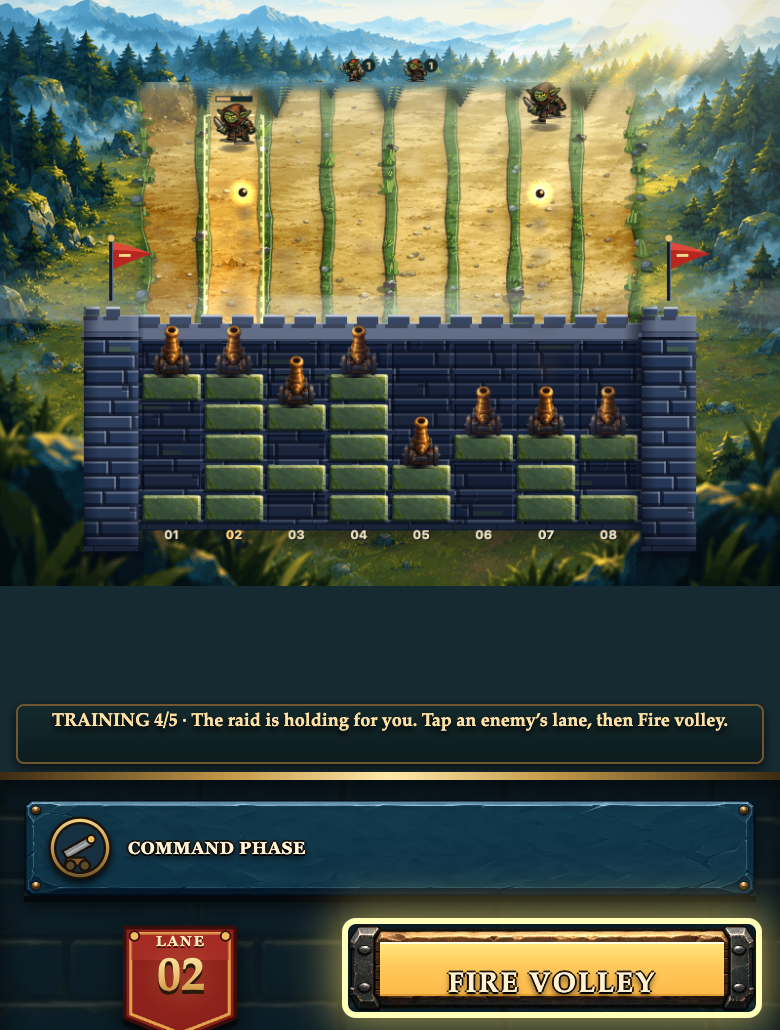
If the enemies stop moving during your first Wattle Keep raid, read the training message before restarting. At step 4/5, the game deliberately holds the raid so you can aim and fire. Select a lane containing an enemy, then press Fire volley. Waiting alone won’t advance that step.
There is one more required action after the raid: buying an upgrade. This guide follows the Copper Gate training round through both stops and into the next building phase.
Drop, rotate, then spread the wall
Choose Learn by playing from the game’s menu. Training starts with a square piece hovering over the middle of the wall. The dotted outline shows where it will land, not masonry you have already placed.
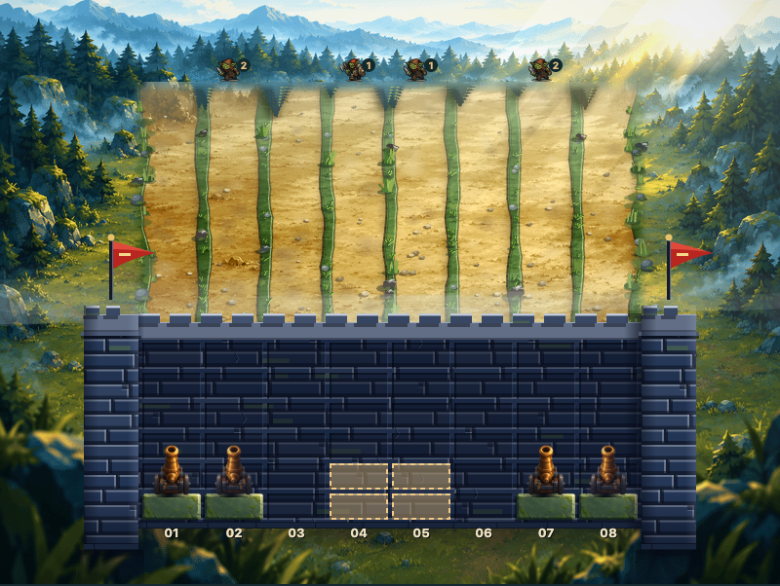
Follow the opening prompts in order:
- Press Drop masonry to place the square.
- Press Rotate once for the next piece.
- Press Drop masonry again to place that rotated piece.
- Place the remaining three pieces, moving them away from a blocked stack when necessary.
The on-screen arrows move the piece, and tapping or clicking the battlefield chooses a column. On a keyboard, use Left and Right to move, Up to rotate and Space to drop. Building has no timer, so you can inspect the landing outline before committing.
The first two drops leave a tall stack near the middle. In our checked run, the next piece could not land there: the game highlighted the movement and rotation controls instead of Drop. Moving it aside made room. If Drop seems unresponsive, look at the current prompt and the outline rather than repeatedly pressing it.
Try to cover empty lanes as you place the remaining pieces. Each occupied lane gets an automatic cannon. A tall stack in one column does not give the neighboring empty column a cannon. You don’t need a perfect wall to learn the controls, but spreading the pieces gives more lanes their own defense.
Aim before firing the held volley
After the fifth piece, building gives way to the siege. The training raid runs briefly, then holds for the aiming lesson. The message says it is holding for you; this is different from the separate pause menu.
In the screenshot at the top of this guide, enemies are in lanes 02 and 07. We clicked lane 02, changing the readout from 04 to 02 and moving the bright aiming strip beneath the left enemy. Fire volley then gained its outline. Pressing it hit the enemy and released the hold. The instruction changed to tell us to keep firing and spend salvage after the raid.
The lane readout is your check before shooting. Clicking the battlefield aims; it does not also fire. You can instead move the aim with Left and Right, then use Space to fire.
During the running siege, the cannons shoot automatically, while your manual volley has a reload delay. Wait for the button to become ready again before taking the next shot. Aim where there is an enemy rather than leaving the selector on an empty road.
Buy an upgrade to unlock raid two
Repelling the first raid opens the resupply panel. Training is not finished yet, so Build for raid 2 stays unavailable until you buy an upgrade.
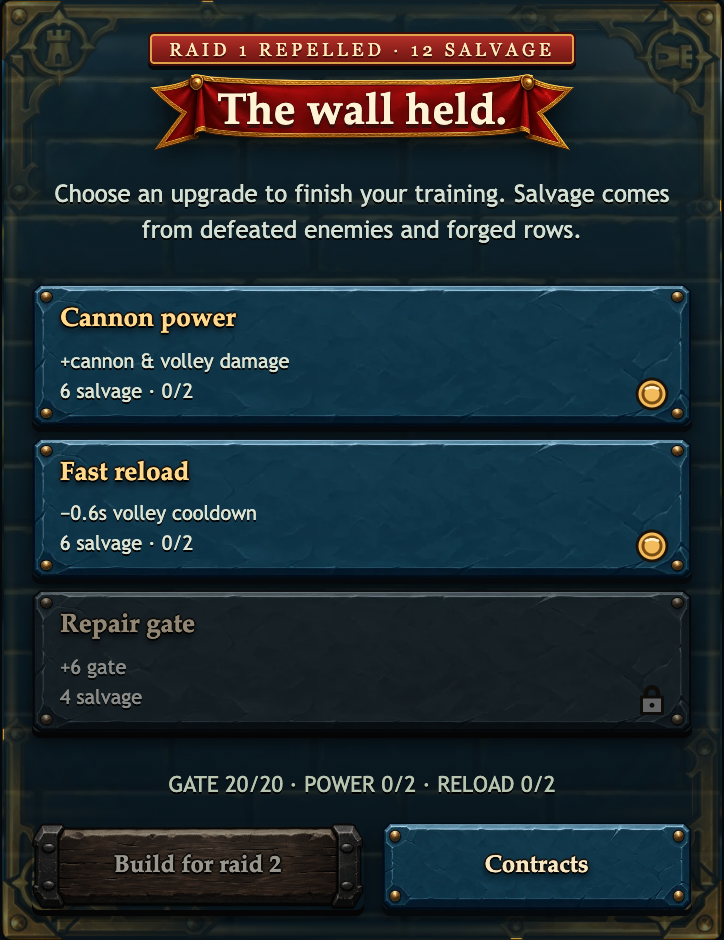
The first Cannon power upgrade costs six salvage and increases cannon and volley damage. The first Fast reload upgrade also costs six and cuts the manual volley’s cooldown by 0.6 seconds. Repair gate costs four and restores up to six gate integrity, but it is unavailable when the gate is already full.
We chose Fast reload. Salvage fell from 12 to six, the reload level changed from 0/2 to 1/2, and Build for raid 2 became available. Pressing it opened another building phase. You can choose Cannon power instead; Fast reload is the demonstrated choice here, not a claim that it is always best.
Copper Gate has three raids, so clearing the first one is not the contract win. Keep the gate above zero through all three. For now, the useful check is simpler: once you can build for raid two, you have completed the training sequence.
Checked against Wattle Keep v4 on 30 September 2026 in Chrome using ordinary pointer controls. Screenshots show one completed first raid, not a guaranteed result. Phone-width images are not a physical-phone playtest.